A strong internet connection is required for screen sharing and video conferencing
via Microsoft Teams.
A functioning camera and microphone are highly recommended.
Log in at least 5 minutes before your scheduled appointment.
Click on your Microsoft Teams appointment link that your tutor sent you.If you did
not receive a Teams link, please reach out directly to your tutor.
Click on "Join" meeting in the Microsoft Teams app or web browser window.
You must have access to a computer and internet for virtual online tutoring sessions.
E-TUTORING FOR WRITING CONSULTATIONS
Choose the "Writing" option while making your appointment.
Email your paper, report, document, etc. to your writing consultant, including:
The draft you're working on;
Assignment guidelines or instructions from your professor;
2-3 questions you would like to discuss with your consultant;
Additional details (i.e. writing prompt, topic, question, specific concerns, etc.)
Submit your paper and prompt to your consultant at least an hour before your consultation session. Failing to do so may result in cancellation of your writing consultation.
Documents should be in Microsoft Word (.doc or .docx) format.
You will meet with your writing consultant during your scheduled appointment to discuss
and review the feedback.
Writing style guides for APA, MLA, Chicago style and other resources are also available
under the “Tutoring Resources” tab.
EXPANDED ONLINE TUTORING is available via Brainfuse
Additional 24/7 online tutoring is available via Brainfuse.
Brainfuse offers USF students a free resource to connect with a live tutor for over 300 subjects.
Typical sessions are up to one hour long each.
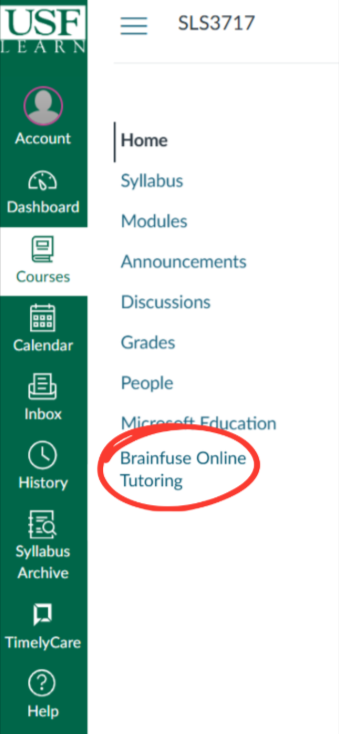
Students can access the Brainfuse tool through their Canvas course - the course ID will automatically load into the
Brainfuse Tutoring dashboard.